Here we go.. 2010 ELECTION RESULTS from COMELEC!
Updated by COMELEC:
http://electionresults.comelec.gov.ph/
or check it here:
http://electionresults.ibanangayon.ph/res_reg0.html
Just search your desired locality, and browse for the results.
And for partial unofficial Tally (with Local candidates),
Go to the following GMA news links,
NATIONAL:
http://www.gmanews.tv/eleksyon2010/nationalcount
LOCAL/REGIONAL:
http://www.gmanews.tv/eleksyon2010/regionalcount
Showing posts with label comelec. Show all posts
Monday, May 10, 2010
COMELEC: 2010 Election Results
Labels:
#halalan,
comelec,
election 2010,
halalan 2010,
pcos machine,
philippines
Philippine COMELEC should have warn every FILIPINO that election will be longer.
Labels:
comelec,
election 2010,
halalan 2010,
pcos machine,
philippines
Friday, May 7, 2010
Automated Election 2010: How to vote using PCOS machine
Labels:
comelec,
election 2010,
halalan 2010,
philippines
Philippines National Elections – How to Find your Precinct ONLINE!
In the upcoming Philippine general/national elections let your voices be heard! Go out and exercise your freedom to VOTE. But wait, are you a registered voter and do you know where to cast your vote already?
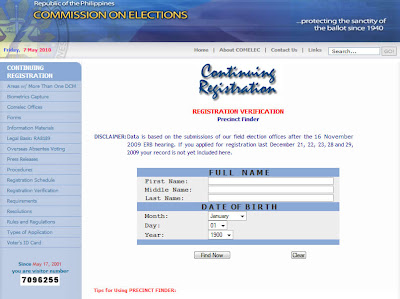
If not, good thing COMELEC (Commission on Elections) has prepared a tool to verify online that a voter is eligible to participate in the upcoming elections. The "REGISTRATION VERIFICATION and PRECINCT FINDER". It can be found on its website: http://www.comelec.gov.ph/precinctfinder/precinctfinder.aspx
Here's what you need to do to verify your registration with Comelec and find your precinct number:
Step:
1. Go to: http://www.comelec.gov.ph/precinctfinder/precinctfinder.aspx.
2. Input all the required data in the form: First Name, Middle Name, and Date of Birth
3. Click Find now and wait for the page to LOAD your voter's info!
4. Then copy or take note the info given.
COMELEC Disclaimer: Data is based on the submissions of our field election offices after the 16 November 2009 ERB hearing. If you applied for registration last December 21, 22, 23, 28 and 29, 2009 your record is not yet included here.
Sample Screenshot (click to enlarge):

HOW TO LOCATE YOUR PRECINCT:
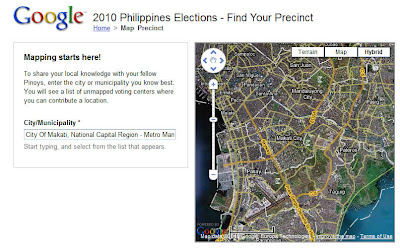
If you happen to transfer to a new location/place or doesn't know where your precinct is located, ask GOOGLE MAPS for help. Google, the leader in Search provider industry has prepared this tool to help us find our voting precinct.
Just follow these steps:
1. Go to Google's Find your voting center landing page.
2. Click on www.findyourprecinct.ph.
2. Type your city/municipality.
3. Then your PRECINCT NUMBER.
4. Wait for Google maps to appear.
Or, you can help to find other voters precinct.
Just visit: http://www.findyourprecinct.ph/
and click Help others find Precincts
Google Screenshot:

If not, good thing COMELEC (Commission on Elections) has prepared a tool to verify online that a voter is eligible to participate in the upcoming elections. The "REGISTRATION VERIFICATION and PRECINCT FINDER". It can be found on its website: http://www.comelec.gov.ph/precinctfinder/precinctfinder.aspx
Here's what you need to do to verify your registration with Comelec and find your precinct number:
Step:
1. Go to: http://www.comelec.gov.ph/precinctfinder/precinctfinder.aspx.
2. Input all the required data in the form: First Name, Middle Name, and Date of Birth
3. Click Find now and wait for the page to LOAD your voter's info!
4. Then copy or take note the info given.
COMELEC Disclaimer: Data is based on the submissions of our field election offices after the 16 November 2009 ERB hearing. If you applied for registration last December 21, 22, 23, 28 and 29, 2009 your record is not yet included here.
Sample Screenshot (click to enlarge):

HOW TO LOCATE YOUR PRECINCT:
If you happen to transfer to a new location/place or doesn't know where your precinct is located, ask GOOGLE MAPS for help. Google, the leader in Search provider industry has prepared this tool to help us find our voting precinct.
Just follow these steps:
1. Go to Google's Find your voting center landing page.
2. Click on www.findyourprecinct.ph.
2. Type your city/municipality.
3. Then your PRECINCT NUMBER.
4. Wait for Google maps to appear.
Or, you can help to find other voters precinct.
Just visit: http://www.findyourprecinct.ph/
and click Help others find Precincts
Google Screenshot:


Labels:
comelec,
election 2010,
google maps,
halalan 2010,
philippines,
precinct finder